
I'm Abe, and I'll be speaking at FOSS4G Hiroshima 2026. On September 3, 2026, at 15:00, I'll give a talk titled "Why Nominatim Can't Find Hiroshima Peace Memorial Museum - and How to Fix It".
Slides for this talk:
A note before we begin
My English pronunciation isn't great, so I wrote my talk script up as this blog post. On the day I'll stick to it word for word, so please treat it as subtitles to read alongside the slides.
The talk script
Title
Hello. I'm giving a talk titled "Why Nominatim Can't Find Hiroshima Peace Memorial Museum, and How to Fix It". A facility right near this venue doesn't show up when you search for it. That bothered me, so I looked into how to fix it.
About me
My name is Abe Tomoaki. I'm a software engineer in Japan, working on FOSS development, especially full-text search. I work at ClearCode, where we develop the full-text search engines Groonga and PGroonga. Today, I'll show how to improve search with PGroonga.
Let's try it
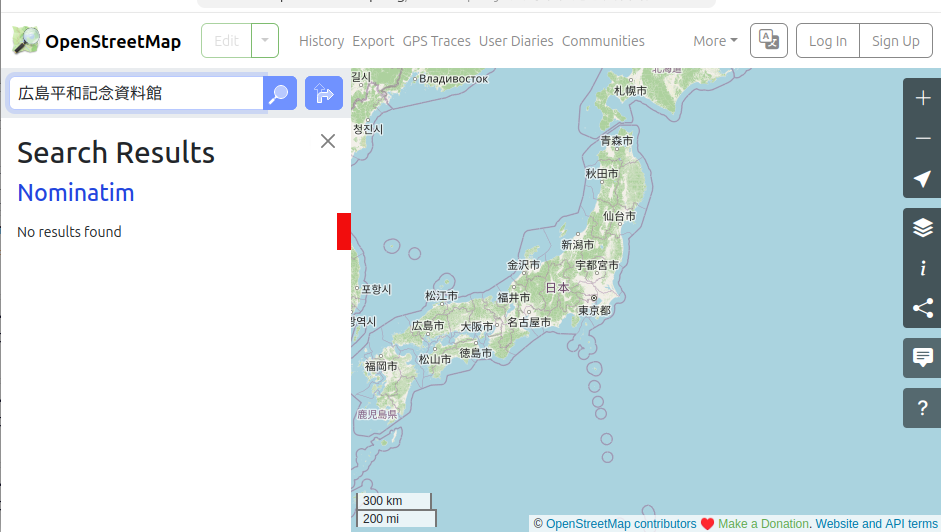
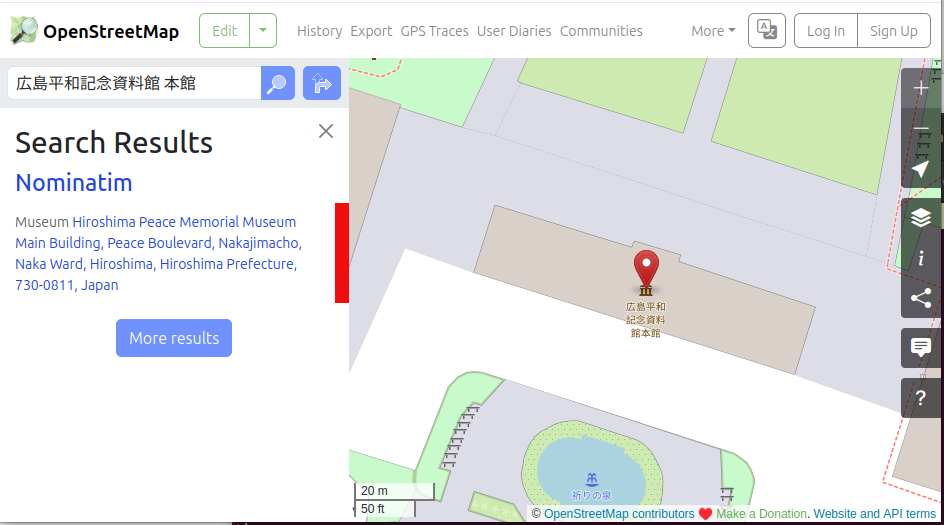
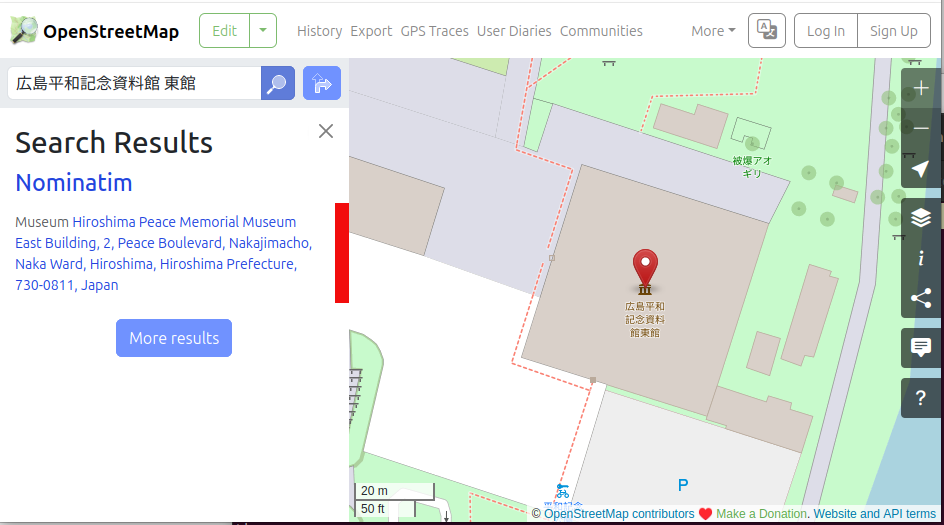
To check today's problem, let's start by searching on the OpenStreetMap website. I search for "広島平和記念資料館", and I get zero hits. But if I add the building name, such as "広島平和記念資料館 本館" or "広島平和記念資料館 東館", it hits. So the data does exist.
広島平和記念資料館
Search on https://www.openstreetmap.org/
広島平和記念資料館 本館
広島平和記念資料館 東館
Results
| Query | Result |
|---|---|
| 広島平和記念資料館 | No hits |
| 広島平和記念資料館 本館 | Hit |
| 広島平和記念資料館 東館 | Hit |
Here's the summary. Normally, people don't include a building name like 本館 or 東館 when they search. So when you just search "広島平和記念資料館", you can't find it. Today I'll talk about why it isn't found, and how to make it findable.
The key point is that the data for "広島平和記念資料館 本館" and "広島平和記念資料館 東館" exists, yet searching "広島平和記念資料館" finds nothing. This happens because of how Nominatim searches. Let's go through it step by step.
Nominatim
First, Nominatim is the software behind search on OpenStreetMap. You can tell because "Nominatim" also appears in the search results. It's an OSM-based geocoder, and it's multilingual. However, for CJK (Chinese, Japanese, Korean), it sometimes doesn't search as expected.
How search works
It searches using "tokens". It splits a name into words and matches them. These words are called tokens. Both the name and the query are split the same way and compared.
Search (partial match)
A place hits if it contains all of the query's words. For example, "広島平和記念資料館" is contained in "広島平和記念資料館 本館", so it should hit. Since this is a partial match, it can hit a lot of places. So, for performance, Nominatim applies various search optimizations internally. And in fact, this optimization can go wrong, leading to a search that doesn't hit.
So what is actually happening?
Searching with "広島平和記念資料館" is a subset of "広島平和記念資料館 本館 / 東館", so it should hit. But in reality it doesn't. That's because the optimization backfires. Exactly how it backfires is a problem that can happen outside CJK too, so I've put the details in the appendix. In this talk, I'll focus especially on where CJK search goes wrong.
Why CJK doesn't work well
Let me give two reasons CJK doesn't work well. One is the search optimization backfiring, as just mentioned. It's especially prone to backfiring in CJK. The other is that kanji, once split into tokens, are ultimately treated with Chinese readings. Let's look at each.
For the first, the optimization backfires. The longer the name, the more tokens it splits into, so it happens more easily. It's especially likely in CJK, where word boundaries are unclear.
For the second, Nominatim converts the split kanji tokens not to their Japanese readings but to Chinese readings, and searches with those. As a result, places that are different in Japanese kanji can end up with the same reading, which lowers search precision. Let's look at a concrete example.
Example: li yuan
I converted several words that appear in place names. As you can see, they're clearly different places. But after conversion, they all become the same 'li yuan'.
from icu import Transliterator
t = Transliterator.createInstance('Any-Latin; Latin-ASCII; Lower()')
for w in ['笠原','栗原','栃原','立原','梨原']:
    print(w, '->', repr(t.transliterate(w)))

# Output:
# 笠原 -> 'li yuan'
# 栗原 -> 'li yuan'
# 栃原 -> 'li yuan'
# 立原 -> 'li yuan'
# 梨原 -> 'li yuan'
Example: query "笠原"
Even when I search "笠原" in the demo environment I built for this talk, you can see it hits unrelated places.
$ docker compose exec -T -e NOMINATIM_PGROONGA=off nominatim nominatim search --query "笠原" | grep '"display_name"'
        "display_name": "栃原, 大台町, 多気郡, 三重県, 519-2423, 日本",
        "display_name": "立原, 福知山市, 京都府, 620-0917, 日本",
        "display_name": "栃原, 下市町, 吉野郡, 奈良県, 638-0041, 日本",
        "display_name": "栗原, 上郡町, 赤穂郡, 兵庫県, 678-1256, 日本",
        "display_name": "栗原, 度会町, 度会郡, 三重県, 516-1238, 日本",
        "display_name": "栃原, 伯耆町, 西伯郡, 鳥取県, 689-4222, 日本",
        "display_name": "栃原, 美咲町, 久米郡, 岡山県, 日本",
        "display_name": "栗原, 大津市, 滋賀県, 520-0516, 日本",
        "display_name": "栗原, 真庭市, 岡山県, 719-3153, 日本",
        "display_name": "梨原, 佐治町高山, 佐治, 鳥取市, 鳥取県, 689-1312, 日本",
Search demo
With all this in mind, let's search "広島平和記念資料館" again in the demo environment. The demo environment has only the data for the Chugoku and Kansai regions imported. As we already knew it would, nothing hits.
$ docker compose exec \
  -e NOMINATIM_PGROONGA=off \
  nominatim \
  nominatim search --query "広島平和記念資料館"
2026-08-06 22:43:19: Using project directory: /nominatim/project
[]
Solution: full-text search
So, as for how to make it findable, we introduce full-text search. Specifically, we add PGroonga, a PostgreSQL full-text search extension. It can be written in SQL, so it also works through an ORM, which is nice and easy. Even to add it to Nominatim, it only takes changing a few lines across 3 files.
What is PGroonga?
Let me briefly explain PGroonga, which just showed up out of nowhere. PGroonga is a PostgreSQL extension for full-text search. It's based on a full-text search engine called Groonga. You can choose a CJK-capable tokenizer. In this environment, I use Bigram. Morphological analysis with MeCab is also available.
PGroonga: easy to use
It's usable from the familiar SQL, and you can even do full-text search with the LIKE you're used to. This time, I use the more efficient
&@operator.
Nominatim + PGroonga
To add it to Nominatim, I set it up to run full-text search against a column called
all_names, which holds the names themselves before tokenization. Because it's full-text search, it hits even on partial matches. And more places become findable without adding new aliases likealt_nameorshort_name. That said, if an alias is completely different from the official name, you do need to add data. I'll come back to this later.
The change (code excerpt)
Let's look at the code change too. The diff is a bit long, but the key part is
op('&@'). It adds a full-text-search condition to the search conditions. The existing search stays as is, and I've just added full-text search on top.
# src/nominatim_api/search/db_searches/place_search.py
- for lookup in self.lookups:
-   sql = sql.where(lookup.sql_condition(t))
+ lookup_conditions = [lookup.sql_condition(t) for lookup in self.lookups]
+ if self.query_text:
+     name_match_condition = t.c.all_names.op('&@')(self.query_text)
+     if lookup_conditions:
+         sql = sql.where(sa.or_(sa.and_(*lookup_conditions), name_match_condition))
+     else:
+         sql = sql.where(name_match_condition)
+ elif lookup_conditions:
+     sql = sql.where(sa.and_(*lookup_conditions))
Demo with PGroonga
Let's search in the demo environment with this change. This time, as expected, it's found.
$ docker compose exec \
  nominatim \
  nominatim search --query "広島平和記念資料館"
2026-08-06 22:59:50: Using project directory: /nominatim/project
[
    {
        "place_id": 1069413,
        "licence": "Data © OpenStreetMap contributors, ODbL 1.0. http://osm.org/copyright",
        "osm_type": "way",
        "osm_id": 60867022,
        "lat": "34.3915495",
        "lon": "132.4530979",
        "category": "tourism",
        "type": "museum",
        "place_rank": 30,
        "importance": 9.99999999995449e-06,
        "addresstype": "tourism",
        "name": "広島平和記念資料館東館",
        "display_name": "広島平和記念資料館東館, 2, 平和大通り, 中島町, 中区, 広島市, 広島県, 730-0811, 日本",
        "boundingbox": [
            "34.3912687",
            "34.3918269",
            "132.4527648",
            "132.4534301"
        ]
    },
    {
        "place_id": 1078343,
        "licence": "Data © OpenStreetMap contributors, ODbL 1.0. http://osm.org/copyright",
        "osm_type": "way",
        "osm_id": 60867023,
        "lat": "34.3918121",
        "lon": "132.4521048",
        "category": "tourism",
        "type": "museum",
        "place_rank": 30,
        "importance": 9.99999999995449e-06,
        "addresstype": "tourism",
        "name": "広島平和記念資料館本館",
        "display_name": "広島平和記念資料館本館, 平和大通り, 中島町, 中区, 広島市, 広島県, 730-0811, 日本",
        "boundingbox": [
            "34.3916233",
            "34.3920004",
            "132.4516421",
            "132.4525610"
        ]
    }
]
Performance (speed)
Let me touch on performance. Building the PGroonga index adds work, so data import takes longer. Specifically, for the 780,000 rows in this demo environment, it takes about 3 extra minutes. Those 3 minutes are about 16% of the total import time. The search itself was about 0.2 ms inside PostgreSQL.
Performance (size)
The PGroonga index size is 106 MB. It's about the same as the existing
name_vectorindex, and smaller than thenameaddress_vectorindex. Even added on top of Nominatim, I think both the build cost and the search speed stay relatively light.
Why a PostgreSQL extension?
For full-text search, I chose a PostgreSQL extension. That's because running on PostgreSQL alone is one of Nominatim's strengths, and I wanted to keep it. You don't need to set up a separate search engine, and you can operate it just as before.
Proposal: a plugin mechanism for Nominatim
PGroonga is just one example. There are many other useful extensions. I'd like to propose to upstream a mechanism that makes it easy to plug such extensions into Nominatim.
The other axis: improving OSM data
We've confirmed that introducing PGroonga looks likely to raise the hit rate. But if an alias is completely different, then unless that data is registered, you still won't find it by searching.
Example: gaps in OSM data
Here's an example of something that isn't registered. The museum's common name "原爆資料館" isn't registered in
short_name, so searching "原爆資料館" doesn't hit. This is the same even with PGroonga. You need to add the data. Only when both technology and data come together can you achieve a better search experience.
| Facility | Common name | short_name | Result |
|---|---|---|---|
| 広島平和記念資料館 | 原爆資料館 | empty | not found |
A challenge common to CJK
This time I only verified with Japanese. I think it's quite likely the same problem occurs in Chinese and Korean as well. This full-text-search approach can, in principle, apply to all three languages and should solve the problem.
Summary
To summarize, CJK search had problems. By using PGroonga, we can likely fill those gaps. And we can do it easily, without changing the architecture.
Outlook
PGroonga is one example. If Nominatim had a "mechanism to plug in extensions", it would likely become even more useful. And by advancing data maintenance as well, I want to keep improving CJK search.
Appendix: Background 1
This is a supplement to "the optimization backfires". Before the optimization, let's organize how the search works.
Nominatim's tokens hold name data and address data. Here is the example for "広島平和記念資料館 本館".
Example for "広島平和記念資料館 本館":
- Name: 広島 / 平和 / 記念 / 資料館 / 本館
- Address: 平和大通り / 中島町 / 中区 / 広島市 / 広島県
Appendix: Background 2
The query is tokenized the same way.
Example when the query is "広島平和記念資料館":
広島 / 平和 / 記念 / 資料館
Appendix: Looks like it should hit...
All of the query's tokens are contained in the data, so it looks like it should be found.
- Data: 広島 / 平和 / 記念 / 資料館 / 本館
- Query: 広島 / 平和 / 記念 / 資料館
Appendix: The actual search
Nominatim doesn't know in advance which parts of the query are the name and which are the address. So in practice it splits the query into a "name part" and an "address part", and runs two searches, a "name search" and an "address search". It tries many ways of splitting. In this example, suppose it splits as follows.
Example: query "広島 / 平和 / 記念 / 資料館"
- Name part: 資料館
- Address part: 広島 / 平和 / 記念
Appendix: The actual search (address)
Looking at the "address search" in that split example, you can see that "記念" isn't contained in the data. Because of this, the address doesn't match, and you end up with a search that returns zero results.
- The data's address:
- 平和大通り / 中島町 / 中区 / 広島市 / 広島県
- Query (address part):
- 広島 / 平和 / 記念
Appendix: Search optimization
So far I've shown only one split example. In reality, many such candidates are generated, and the optimization picks whichever candidate is easiest to search. If a non-hitting candidate like the one in this example is chosen, you get no hit. Actually, a hitting candidate is generated too. But if that candidate is judged too costly, it isn't chosen. So only non-hitting candidates get executed, and you end up with zero results.
Appendix: A note
The appendix explanations prioritize clarity. As a result, there are many imprecise descriptions. Please bear with me.
Wrapping up
As a blog post in script form, it was probably hard to follow. Sorry about that. This is roughly what I'll present on the day. Thanks for reading.
Links
- This PoC (Nominatim + PGroonga)
- https://github.com/abetomo/Nominatim (pgroonga branch)
- Demo environment (Docker Compose)